AI image tools compared: ChatGPT, Gemini, Midjourney, Firefly, Ideogram, Canva and more
Every big AI assistant now draws, and a dozen specialists do it better at one thing or another. What each tool is good at, what it costs, who owns the pictures, and which images you can safely use in your business.
In short
- For everyday images, the assistant you already use is enough: ChatGPT Images 2.5 and Google's Nano Banana 2 both make and edit pictures, and both mark them as AI-made.
- For commercial work with the least legal risk, Adobe Firefly is trained on licensed content and Adobe calls its output safe for commercial use. Plans start at $9.99 a month.
- For style, Midjourney is still the artists' choice, but there is no free trial, images are public by default, and companies earning over $1 million a year need its $60 Pro plan.
- For text inside images, such as posters and logos, Ideogram is the specialist. Free images are public; paid plans start at $20 a month.
- We tested four model hubs with the same five prompts: Krea's free plan was the fastest and most accurate; Plnty edited a real photo best; all four spelled a poster correctly.
- Free plans usually mean public images, watermarks or your pictures used for training. Check the ownership terms before you use an image in an advert or a product.
Making a picture used to mean a photographer, a designer or a stock-photo subscription. Now you type a sentence. The results are good enough for social posts, presentations, product mock-ups and, increasingly, real adverts.
The hard questions are no longer about quality. They are about rights. Who owns the picture? Can you use it to sell something? Is everyone else able to see what you made? The answers differ a lot from tool to tool.
How we compared them: from each company’s own pricing, help and legal pages, checked on 6 October 2026; the model hubs section was updated after our own test on 17 November 2026. Prices are in US dollars unless marked. Plnty gave us a free test account, and we are in its affiliate programme, which pays in Plnty credits, not money; we have no deals with the other companies here. The cover is an Unsplash photo; the images in the test section were made by the AI tools.
The short answer
| You want… | Use | Why |
|---|---|---|
| quick images and edits in a chat you already use | ChatGPT or Gemini | no extra subscription, good editing |
| images for adverts and products, with low legal risk | Adobe Firefly | trained on licensed content, Content Credentials, indemnity for big customers |
| striking, artistic images | Midjourney | still the strongest look and style |
| readable text in images: posters, logos, menus | Ideogram | built for typography |
| social posts and marketing designs | Canva | images straight into templates |
| to try many models in one place | Krea, or Plnty for photo edits | best in our five-prompt test of four hubs |
In the assistant you already have
ChatGPT Images
OpenAI’s latest image model, ChatGPT Images 2.5, arrived on 8 September 2026 for all ChatGPT users. OpenAI says it keeps finer detail, edits more precisely over several rounds, keeps people and products from your reference photos recognisable, and makes transparent backgrounds. You can also sketch a rough guide and let it fill in the picture.
Free users get limited image creation; Plus at $20 a month gives more, and Pro plans more still. Images carry C2PA provenance data and an invisible watermark. You own what you make. On personal plans your content can be used for training unless you opt out; business plans don’t use it by default.
Google Gemini: Nano Banana
Google’s image models go by the nickname Nano Banana. Nano Banana 2 is free for everyone in the Gemini app, and a newer 2.1 version needs a Google AI plan (AI Pro costs $19.99 a month in the US). Google highlights consistent characters across images, text in several languages, precise edits and 2K resolution.
Every image carries a visible watermark and an invisible SynthID mark, and you can upload any image to Gemini to check whether Google’s AI made it. With “Keep Activity” switched on, which is the default, photos you upload may be used to improve Google’s services and seen by human reviewers.
Best for: everyday images, quick edits of your own photos, illustrations for posts and slides.
Adobe Firefly and Photoshop
Adobe’s pitch is safety. It trains its Firefly models on licensed and public-domain content, calls their output “safe for commercial use”, attaches Content Credentials automatically and offers legal indemnity to eligible enterprise customers. It says it doesn’t train on customer content.
| Plan | Per month | Credits a month |
|---|---|---|
| Free | $0 | free daily generations |
| Standard | $9.99 | 2,000 |
| Pro | $19.99 | 4,000 |
| Pro Plus | $49.99 | 10,000 |
| Premium | $199.99 | 50,000 |
Paid plans include unlimited standard generations, and Photoshop’s Generative Fill puts the same tools inside the editor. Firefly and Photoshop now also offer partner models from Google, OpenAI and others. Watch out: Adobe’s “commercially safe” promise is about its own Firefly models, not necessarily the partner models.
Best for: agencies, brands and anyone whose images end up in paid adverts or on products.
Midjourney
Midjourney still makes the most striking images, and its V8.2 model and new edit model keep it ahead on style. But its terms are the strictest in this list.
- Plans: Basic $10 a month, Standard $30, Pro $60, Mega $120. Yearly billing saves 20%.
- No free trial on the website.
- Public by default: your images can appear in Midjourney’s public Explore gallery. Only Pro and Mega have “stealth mode” to keep them private.
- The company rule: a business, or an employee of one, earning more than $1 million a year must use Pro or Mega to own its images.
- Every image carries a hidden ID that can be checked at midjourney.com/verify, though edits and screenshots can remove it.
Best for: artists, designers and mood boards, as long as the work isn’t confidential.
Ideogram
Ideogram specialises in what most image models still get wrong: text. Posters, logos, menus and social graphics come out with words spelt correctly. Its Ideogram 4.0 model, released in June 2026 with open weights, is especially strong at typography.
- Free: 30 credits a week, and everything you make is public.
- Plus: $20 a month ($180 a year), private images.
- Pro: $60 a month ($504 a year).
- Team: $30 per person a month, at least two people.
Ideogram claims no ownership of your images and allows commercial use.
Best for: small businesses making posters, event graphics and anything with words on it.
Canva
Canva’s image generator, Dream Lab, puts AI images straight into designs, templates and brand kits.
- Free: up to 20 AI uses.
- Pro: $144 a year, ten times the AI uses.
- Business: $250 per person a year.
Canva says it never uses content from Teams, Business, Enterprise or Education accounts for training; other users can control this in their privacy settings.
Best for: marketing and social media, where the picture is one part of a design.
Model hubs: Krea, Plnty, Leonardo and Magnific
Model hubs let you try many image and video models behind one login and one credit balance.
- Krea: free 100 compute units a day; Basic from $5 a month billed yearly ($9 monthly), Pro $21 yearly ($35 monthly). Commercial licence on paid plans only.
- Plnty: 250 free credits once, about 35 images; Starter $18 a month ($15 yearly). Images are published unless you switch it off.
- Leonardo (owned by Canva): free 150 tokens a day, but free creations are public and owned by Leonardo; paid plans from $12 a month give you full ownership.
- Magnific (Freepik’s AI suite): the free plan offers only its “Auto” model and no uploads of your own images; Premium from €12 a month billed yearly (€16 monthly).
We tested them: five prompts, four hubs
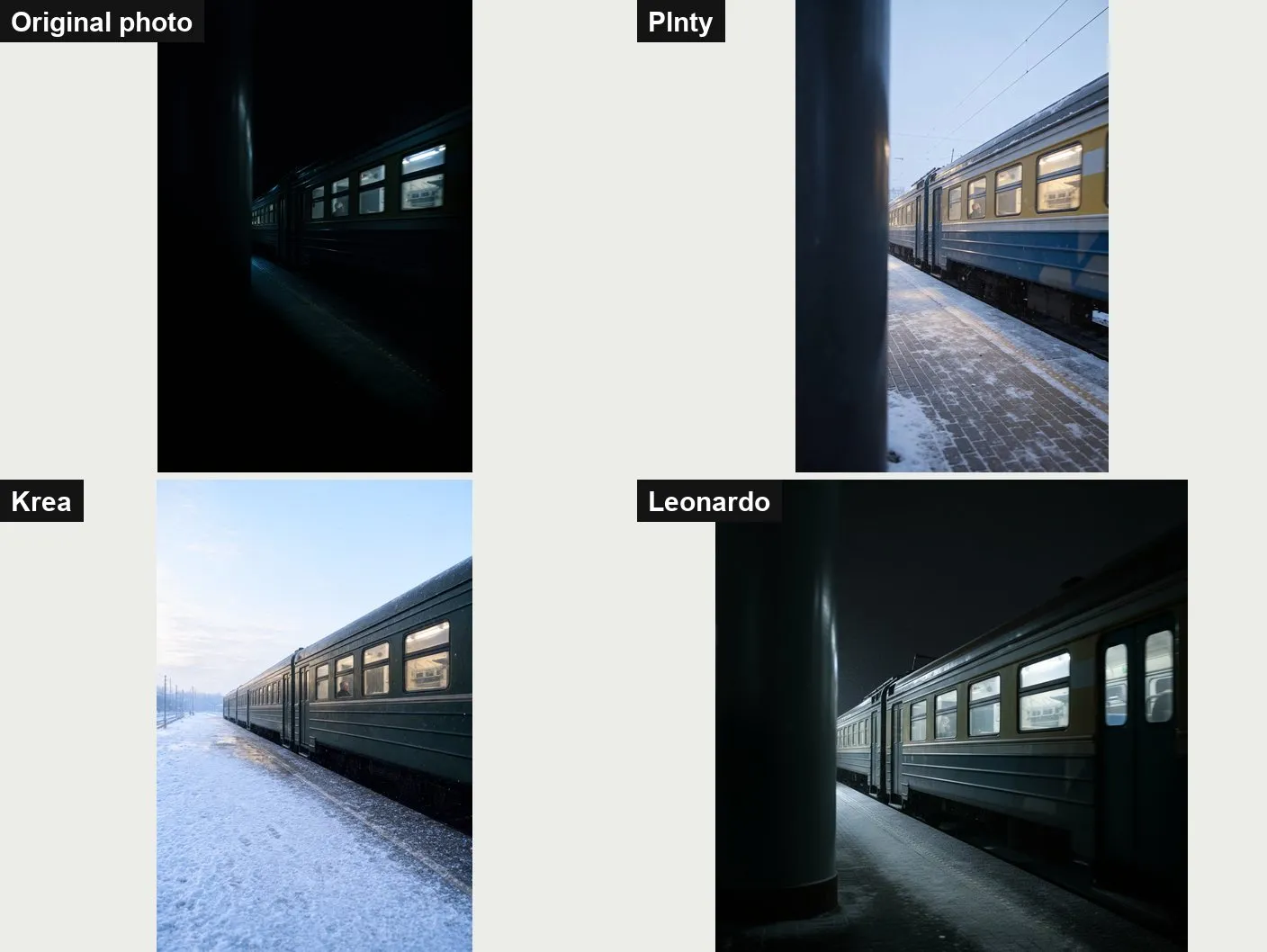
On 17 November 2026 we gave all four the same five prompts on free plans, with each hub’s default model, and kept the first image.
| Plnty | Krea | Magnific | Leonardo | |
|---|---|---|---|---|
| Seconds per image | 28–50 | about 10 | about 12 | 10–23 |
| Poster text | exact | exact | exact | exact, best design |
| Hands (knitting) | ✓ | ✓ best | ✓ | ✗ not knitting |
| Editing our photo | ✓ best | ✓ drops a detail | paid only | ✗ still night |
| Largest free image | 2720×1536 | 2512×1680 | 1280×720 | 1024×1024 |
Krea was the fastest and the most literal, and its default model used none of our free units. Plnty was the only hub that changed our photo the way we asked and kept nearly everything else. Read the full test, with all the images →
Best for: comparing models before you commit to one.
Rules for any AI image
- Read the ownership terms before you sell anything. Free plans often mean the company owns the image, or everyone can see it.
- Keep confidential work off public-by-default tools. Product launches, client designs and unreleased packaging don’t belong in a public gallery.
- Don’t make images of real people without their consent, and never in a misleading or sexual way. Many tools ban it, and in many countries it is illegal.
- Don’t copy living artists or brands by name. Asking for “in the style of” a living illustrator, or a competitor’s logo, invites legal trouble.
- Keep the provenance. Watermarks and Content Credentials tell viewers an image is AI-made. Removing them can break platform rules and, under the EU’s AI Act, transparency obligations.
- Say when it matters. In news, health, politics and anything people might take as a real photo, label AI images clearly.
More tool comparisons
Sources
- OpenAI: Introducing ChatGPT Images 2.5 (8 September 2026)
- OpenAI: ChatGPT pricing
- Google: Image generation in the Gemini app
- Google: Nano Banana 2
- Google Gemini Help: Gemini Apps activity
- Midjourney: Comparing plans
- Midjourney: Terms of Service
- Midjourney: Stealth mode
- Midjourney: Content authenticity
- Adobe Firefly: Plans (checked 6 October 2026)
- Adobe: Firefly's approach to generative AI
- Ideogram: Available plans
- Ideogram: Licensing
- Ideogram: Ideogram 4.0 (3 June 2026)
- Canva: Pricing
- Canva: Canva Shield
- Leonardo.ai: Pricing
- Krea: Pricing
- Plnty: Pricing
- Magnific: Pricing
- AI Beat: We gave four AI image hubs the same five prompts (17 November 2026)
More guides
- AI presentation tools compared: Gamma, Beautiful.ai, Copilot, Gemini and Canva
- AI meeting note-takers compared: Otter, Fireflies, Fathom, Granola, MeetGeek, Notuly and the built-ins
- We gave one meeting to four AI note-takers. Two knew who had to do what
- We gave four AI slide makers the same document. Two of them made up the numbers
- AI audio tools compared: voice, clean-up, editing and music
- We cleaned one noisy 35-minute recording with Diffio and Adobe. Background voices decided it
- AI video tools compared: generators, presenters and editors
- AI data analysis tools compared: from spreadsheets to big data
Comments
What do you think? No account needed. Please be kind; comments that attack people are removed.
No comments yet. Be the first.