We gave four AI image hubs the same five prompts. Krea drew best, Plnty edited best
Five prompts, four model hubs, first image only. All four spelled a poster correctly. Only two could turn a night photo into a winter morning. Krea was the fastest and cost nothing; Plnty gave the biggest pictures and the best edit; Magnific and Leonardo each failed a prompt outright.
In short
- We ran the same five prompts in Plnty, Krea, Magnific and Leonardo on 17 November 2026, on free plans, with each hub's default model, and kept the first image.
- All four got the poster text exactly right, including the dash in '10:00–16:00'. A year ago that alone would have been news.
- Krea was the best all-rounder: about 10 seconds an image, the clearest details, and its default model used none of our free daily units. Free-plan images come without a commercial licence.
- Plnty, which gave us a free test account, edited our night photo best and gave the largest downloads (2720×1536). It was the slowest, at 30 to 50 seconds an image, and it invents small details.
- Magnific drew a teacup instead of a chipped mug and can't edit your own photo on the free plan. Leonardo drew a woman wearing her scarf instead of knitting it, and left our night photo at night.
A model hub sells you many image models behind one login. You type a prompt, the hub picks a model or lets you choose, and you pay in credits. In our guide to AI image tools we compared them on paper. This time we made them draw.
How we tested
Four hubs: Plnty, Krea, Magnific (Freepik’s AI suite, renamed) and Leonardo, which Canva owns.
Five prompts, the same text in every hub:
- A white mug with a small chip on the rim, on an oak table by a window, steam rising. Small details.
- A poster on a brick wall: “SUMMER MARKET”, “Saturday 14 June, 10:00–16:00”, “Main Square, free entry”. Exact text.
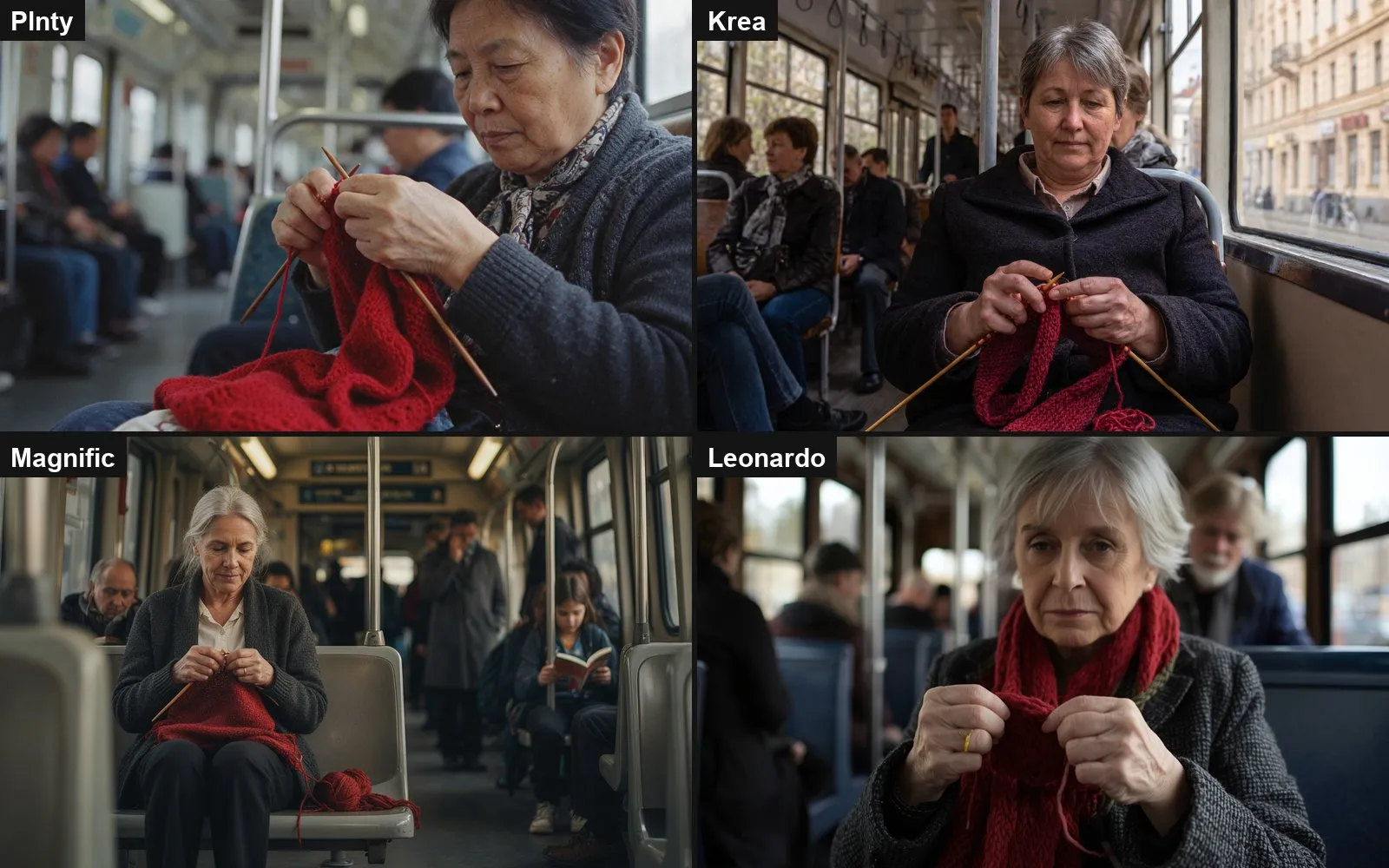
- A woman in her sixties knitting a red scarf on a tram, both hands visible. Hands, the classic failure.
- A fox reading a map at a crossroads, flat vector, only teal, orange and cream. Following a style.
- Our night photo of a train at a platform: make it a bright winter morning with light snow, keep the train, its windows and the camera angle. Editing a real photo.
The rules. Free plans. Each hub’s default model, as a beginner would use it. The first image only, no retries. We timed each image and noted the credits it cost. Everything ran on 17 November 2026.
The defaults were not the same model. Plnty used ByteDance’s Seedream 5.5. Krea used its own Krea 3 in Fast mode. Magnific’s free plan only offers “Auto”, which hides the model. Leonardo’s Auto switched between Lucid Origin for photos, GPT Image 2 for text and drawings, and Google’s Gemini 2.5 Flash Image for the edit. So this is a test of what each hub gives you out of the box, not of the models underneath.
The results
| Plnty | Krea | Magnific | Leonardo | |
|---|---|---|---|---|
| Seconds per image | 28–50 | about 10 | about 12 (for 4 images) | 10–23 |
| Cost of one image | 7 credits (8 for the edit) | nothing | not shown | 8 tokens |
| Free allowance | 250 credits once (about 35 images) | 100 units a day | not stated | 150 tokens a day (about 18 images) |
| Largest free download | 2720×1536 | 2512×1680 | 1280×720 | 1024×1024 |
| 1. Chipped mug | ✓ | ✓ clearest chip | ✗ teacup, stain | ✓ |
| 2. Poster text | ✓ all exact | ✓ all exact | ✓ all exact | ✓ all exact, best design |
| 3. Knitting hands | ✓ | ✓ best | ✓ small | ✗ not knitting |
| 4. Fox, three colours | ✓ invents sign text | ✓ | ✓ but no crossroads | ✓ adds a backpack |
| 5. Photo edit | ✓ best | ✓ drops the pillar | not on the free plan | ✗ still night |
| Our score (1–5) | 4 | 5 | 2 | 3 |
1. The mug: Magnific served tea
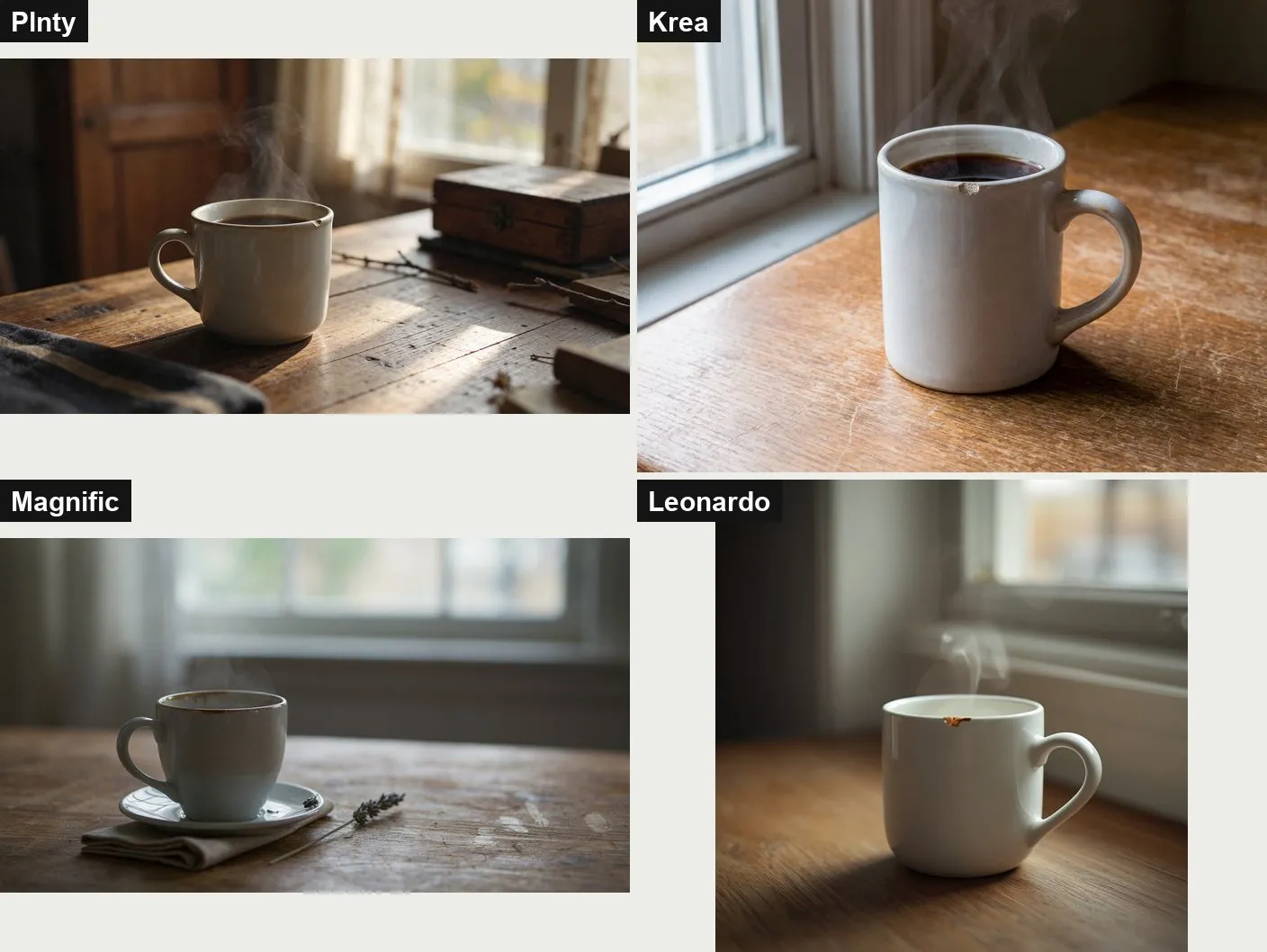
Krea’s chip is the one you would notice from across the room. Plnty’s is there but small, and it filled the table with a box, twigs and a blanket we didn’t ask for. Leonardo’s chip looks more like a coffee stain on the rim.
Magnific missed. It drew a teacup on a saucer, with a brown mark where the chip should be, and added a napkin and a sprig of lavender. Its free plan returns four images per prompt. We kept the first, as we did everywhere. One of the other three may have been better. A beginner wouldn’t know which to pick either.
2. The poster: everyone can spell now
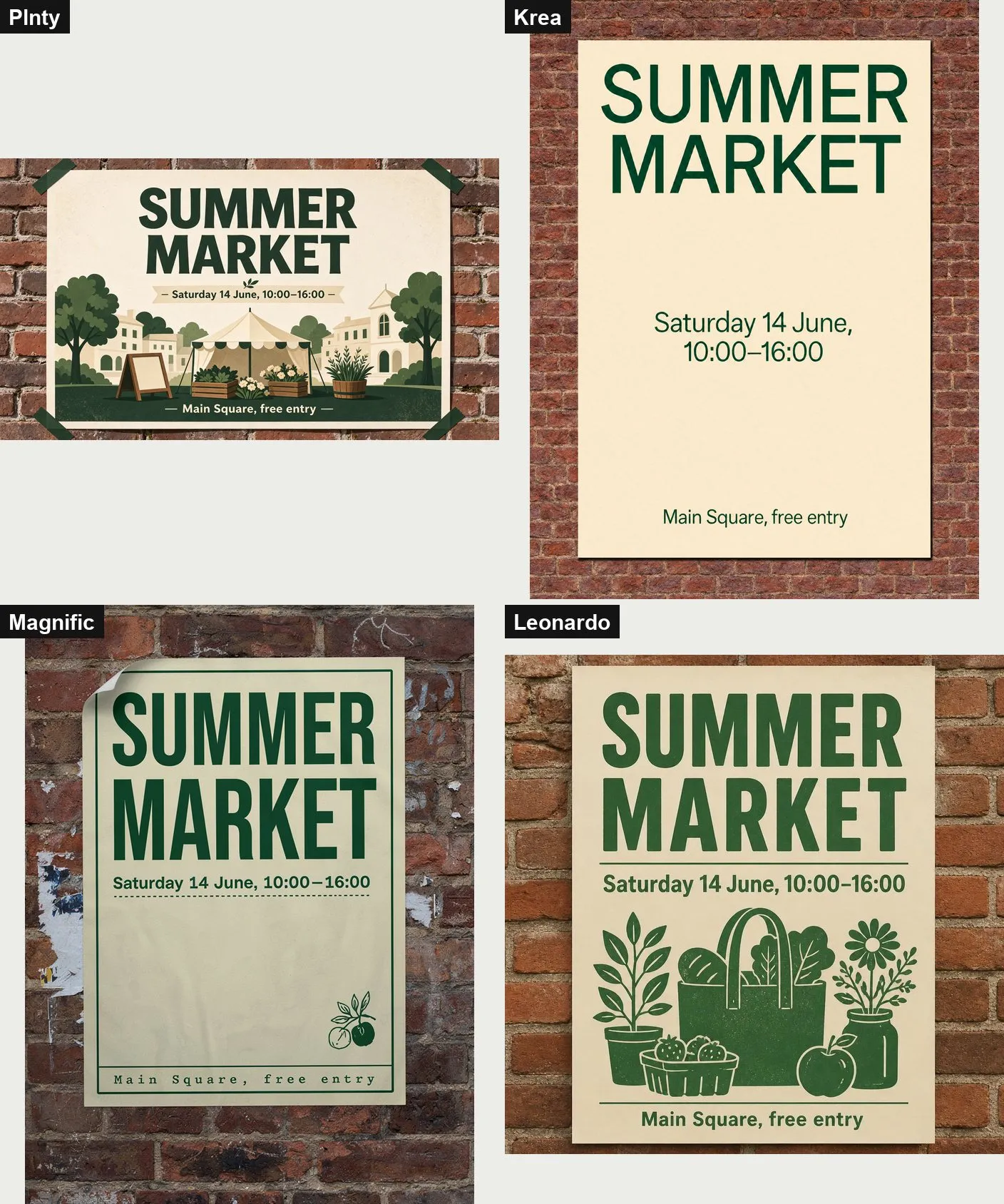
Three lines of text, a date, a time range with a proper dash. All four hubs got every character right. Not long ago, words in AI images came out as alphabet soup. That problem is mostly gone.
The difference is design. Leonardo’s poster is the one you would print: bold heading, clean lines, a market bag full of produce. Krea’s is correct and plain. Magnific set the bottom line in a typewriter font and left a big empty space. Plnty made a landscape poster with a nice illustration, but the prompt asked for portrait. We had left its size setting on 16:9, so that one is on us.
3. Knitting: Leonardo forgot the job
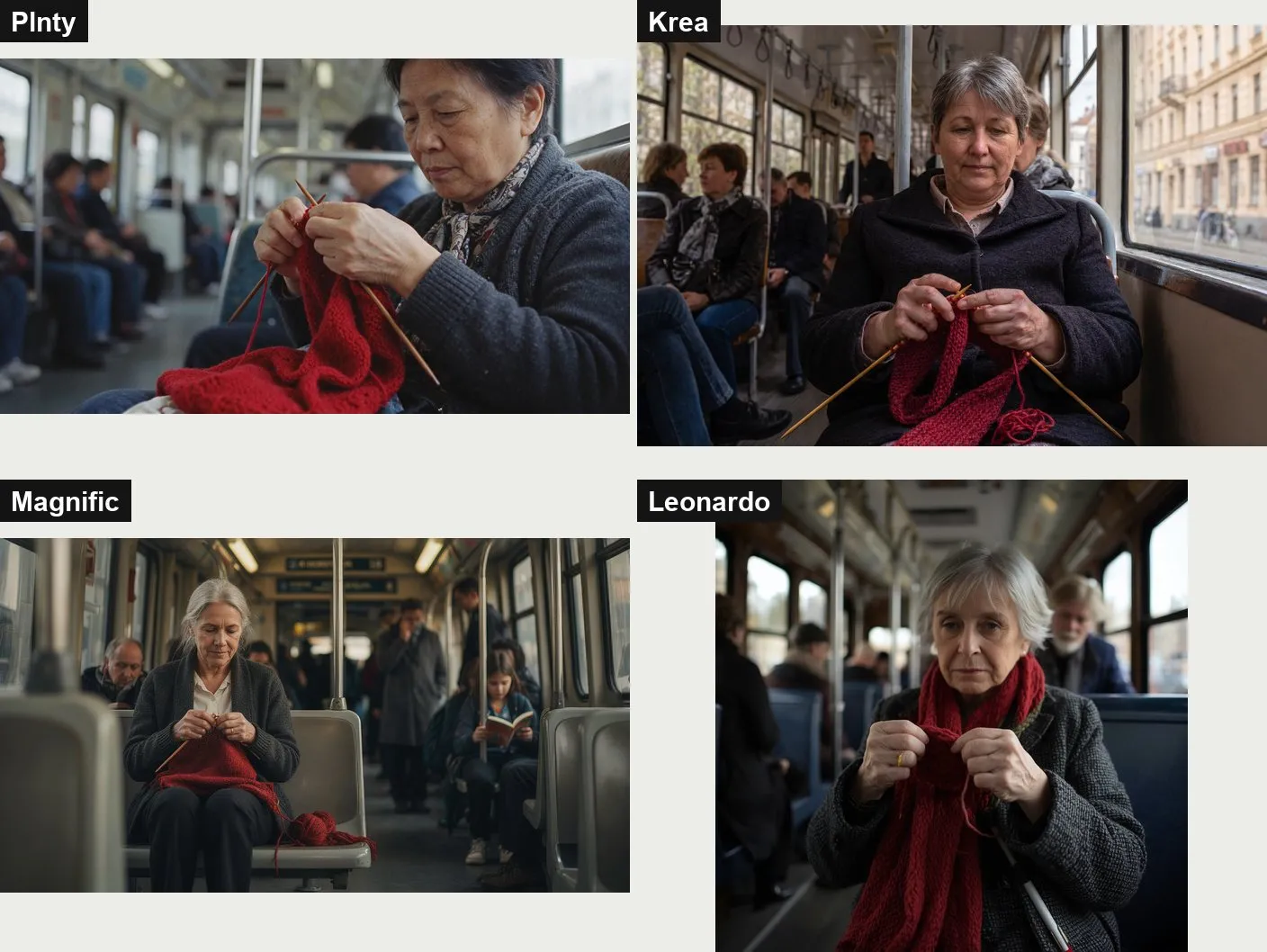
Hands used to be the giveaway of an AI image: six fingers, melted knuckles. Here every hand has five fingers. Krea’s is the best picture: the needles cross the way real needles do and the wool runs to a ball in her lap. Plnty’s is a close, warm portrait. Magnific’s is good but the woman is small in the frame.
Leonardo got the hands right and the action wrong. Its woman wears the red scarf around her neck and holds it like a collar. There is a needle at the bottom of the frame, but nobody is knitting.
4. The fox: small inventions
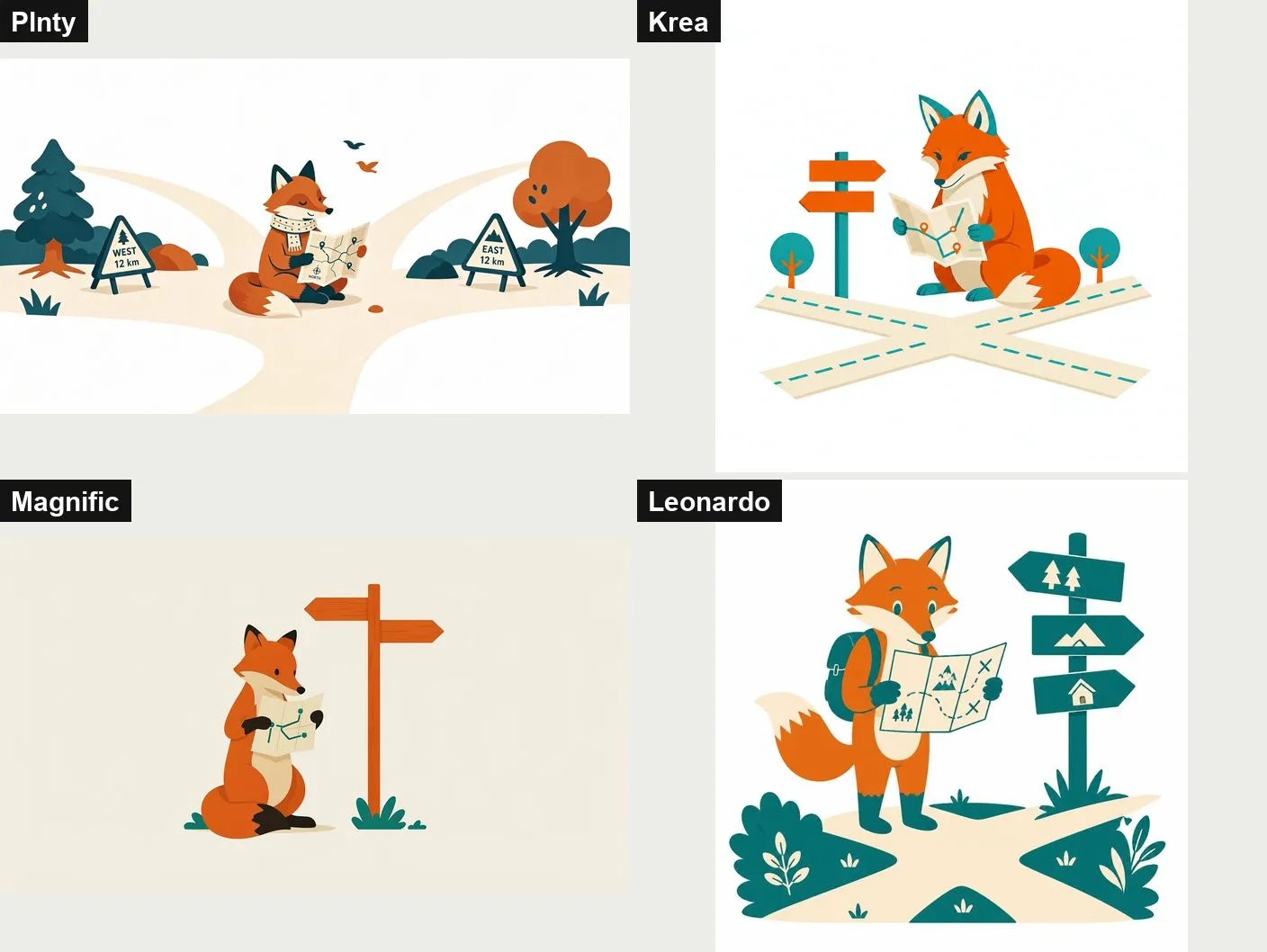
All four kept to teal, orange and cream. All four drew a convincing fox with a map. The differences are in what they added. Plnty put up road signs reading “WEST 12 km” and “EAST 12 km” and gave the fox a scarf. Leonardo gave it a backpack. Magnific left out the crossroads and painted the background cream instead of white. Krea drew what we asked, and nothing else.
Small things. But if you need an illustration for a brand, an invented sign is one more thing to fix.
5. Editing a real photo: the hardest test
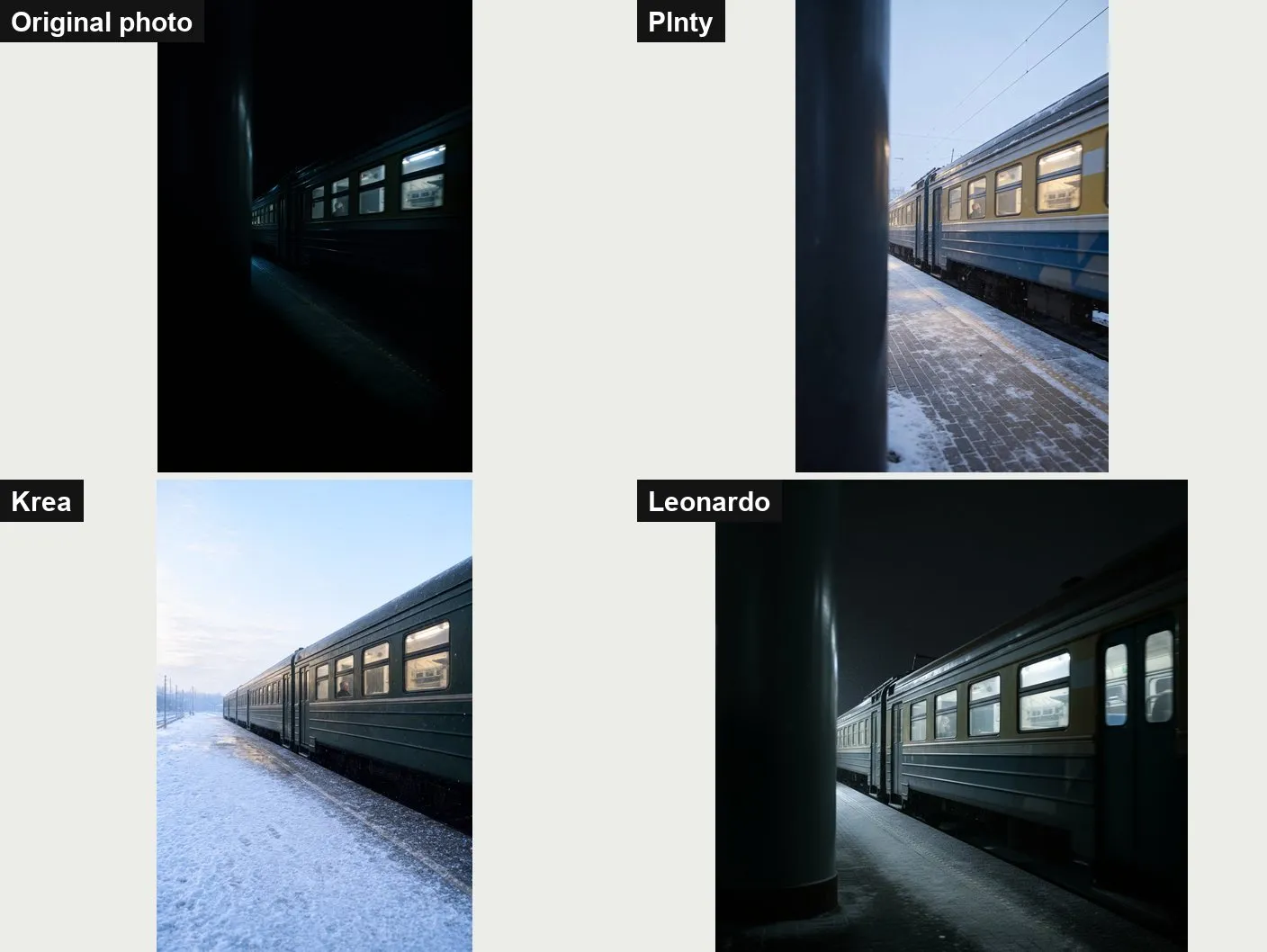
This is the job people actually need: take my photo, change one thing, leave the rest alone. We uploaded a dark photo of a train at a platform, a big pillar on the left, a passenger in one window.
Plnty did it best. The pillar, the angle, the windows, even the passenger are where they were. Night became a pale winter morning with snow on the platform. It also repainted the train yellow and blue, which nobody asked for.
Krea made the nicest-looking morning, with fresh snow and a soft sky. It kept the train, the windows and the passenger, and removed the pillar, which changes the photo.
Leonardo kept nearly everything, including the night. A little snow is falling, and that’s it. It also cropped our tall photo to a square.
Magnific couldn’t try. Uploading your own image needs a paid plan, and the upgrade window greeted us with an unfilled template: images up to {{limit}}.
What you get for free
| Plnty | Krea | Magnific | Leonardo | |
|---|---|---|---|---|
| Free plan | 250 credits once | 100 units a day | Auto model only, no uploads | 150 tokens a day |
| Cheapest paid plan | $18 a month ($15 yearly) | $9 a month ($5 yearly) | €16 a month (€12 yearly) | $12 a month |
| Commercial use of free images | terms allow it, on any plan | licence only on paid plans | pricing page lists a licence only for paid plans | Leonardo owns free images |
| Public by default? | yes, unless you switch off publication | not stated | not stated | yes |
Two warnings. Plnty says it won’t train its own models on your content, but the outside models it runs may use your prompts and images under their makers’ terms. And on Leonardo’s free plan your pictures are public and belong to Leonardo, so don’t put client work there.
What this means for you
- Start with Krea’s free plan. It was the fastest, the most literal and, for its default model, free. Upgrade when you need a commercial licence.
- To edit your own photos, try Plnty. It was the only hub that changed what we asked and kept almost everything else. Check the details: it likes to add things.
- Text in images is solved. Pick a tool for its design sense, not its spelling.
- The default model matters more than the hub. Leonardo and Magnific choose a model for you. When a result is wrong, try choosing one yourself before you give up on the hub.
- Look closely before you publish. Every hub added something we didn’t ask for at least once: a box of twigs, a road sign, a backpack, a new paint job.
How we’re paid: Plnty gave us a free test account with 3,000 credits; the test used 50. The “Try Plnty” link below is our invite link. We are in Plnty’s affiliate programme: sign-ups through that link earn us Plnty credits, not money. The other three hubs ran on free accounts we made ourselves. The scores above were recorded before any of this, and they will not change.
Tested on 17 November 2026. AI tools change often; a newer model may do better or worse. Seen something different? Tell us in the comments.
Sources
More guides
- AI presentation tools compared: Gamma, Beautiful.ai, Copilot, Gemini and Canva
- AI meeting note-takers compared: Otter, Fireflies, Fathom, Granola, MeetGeek, Notuly and the built-ins
- We gave one meeting to four AI note-takers. Two knew who had to do what
- We gave four AI slide makers the same document. Two of them made up the numbers
- AI audio tools compared: voice, clean-up, editing and music
- We cleaned one noisy 35-minute recording with Diffio and Adobe. Background voices decided it
- AI video tools compared: generators, presenters and editors
- AI data analysis tools compared: from spreadsheets to big data
Comments
What do you think? No account needed. Please be kind; comments that attack people are removed.
No comments yet. Be the first.