We cleaned one noisy 35-minute recording with Diffio and Adobe. Background voices decided it
One reader, four rooms: a quiet office, a busy café, an echoing hall and a street. Diffio stripped the voices behind the speaker; Adobe barely touched them. Adobe was better when the recording was already good. Diffio's Pro model sounded the same as its cheaper Flash.
In short
- We built a 35-minute test recording with four kinds of noise and kept a clean copy, so we could measure exactly what each tool removed and what it damaged. Tested on 17 November 2026.
- With other people talking in the background, Diffio was clearly better: intelligibility 0.93 against Adobe's 0.87, and almost no chatter left in the pauses. Adobe kept most of it.
- On an easy recording, Adobe Podcast Enhance was better. Diffio made our quiet section sound slightly worse than the input; Adobe made it better.
- Diffio's Pro model gave almost the same result as Flash. Diffio told us Pro only helps on badly damaged audio. Its WAV download also came out about 13 dB quieter, so turn it up.
- Both handled the full 35 minutes in about a minute, with no drift out of sync.
Every audio clean-up tool promises the same thing: upload your bad recording, get back a studio voice. Most demos use a few seconds of hiss. Real recordings are long, and the noise changes. Someone starts talking at the next table. The hall echoes. A lorry goes past.
Diffio, a newer tool, told us it is built for exactly that: long recordings, over 30 minutes. So we tested it against the free tool most people already use, Adobe Podcast Enhance.
How we tested
The recording. One man reading a Sherlock Holmes story for 35 minutes, from LibriVox, so the speech is public domain. We added noise ourselves, in four sections:
| Time | Section | Noise | How hard |
|---|---|---|---|
| 0:00–10:00 | Quiet room | mains hum and soft hiss | easy |
| 10:00–20:00 | Café | three other people talking, cups clinking | hard |
| 20:00–28:00 | Echo room | strong echo of an empty hall, a fan | hard |
| 28:00–35:00 | Street | traffic rumble, sudden bangs | very hard |
Because we made the noise, we also kept the clean speech. That let us measure each result against the truth, not just listen.
The tools. Diffio’s two models, Flash and Pro, and Adobe Podcast Enhance. Our Adobe account turned out to have Podcast Premium, through an existing Adobe subscription. Each got the same 35-minute MP3, in one upload, on default settings. From Adobe we took “speech only”: its default download mixes 10% of the background and music back in.
The measures. Three standard scores, per section:
- Intelligibility (STOI, 0 to 1): how many words a listener would catch. Higher is better.
- Quality (PESQ, 1 to 4.5): how natural the voice sounds. Higher is better.
- Noise in the pauses (dB): what is left when the speaker stops. Lower is better.
Then we listened.
The results
| Section | Noisy original | Diffio Flash | Diffio Pro | Adobe |
|---|---|---|---|---|
| Quiet room | 1.00 · 3.37 · −25 | 0.95 · 2.95 · −41 | 0.95 · 2.94 · −41 | 0.97 · 3.71 · −53 |
| Café | 0.77 · 1.21 · −9 | 0.93 · 2.14 · −48 | 0.93 · 2.18 · −48 | 0.87 · 1.46 · −15 |
| Echo room | 0.86 · 1.29 · −20 | 0.93 · 2.00 · −46 | 0.93 · 2.02 · −45 | 0.93 · 1.94 · −29 |
| Street | 0.90 · 1.18 · −8 | 0.94 · 2.32 · −46 | 0.94 · 2.34 · −49 | 0.96 · 2.31 · −56 |
Each cell: intelligibility · quality · noise in pauses (dB).
| Diffio | Adobe Podcast Enhance | |
|---|---|---|
| Time for 35 minutes | about 1 minute (Flash and Pro) | about 1 minute |
| Took the whole file? | yes | yes, on Premium (the free plan stops at 30 minutes) |
| Drift out of sync | none | none |
| Download formats | WAV, MP3, M4A (Pro); MP3 (Flash) | MP3, whole mix or speech, music and background apart |
| Cheapest plan that downloads | $8 a month (6 hours) | free, files up to 30 minutes |
The café: where the tools split
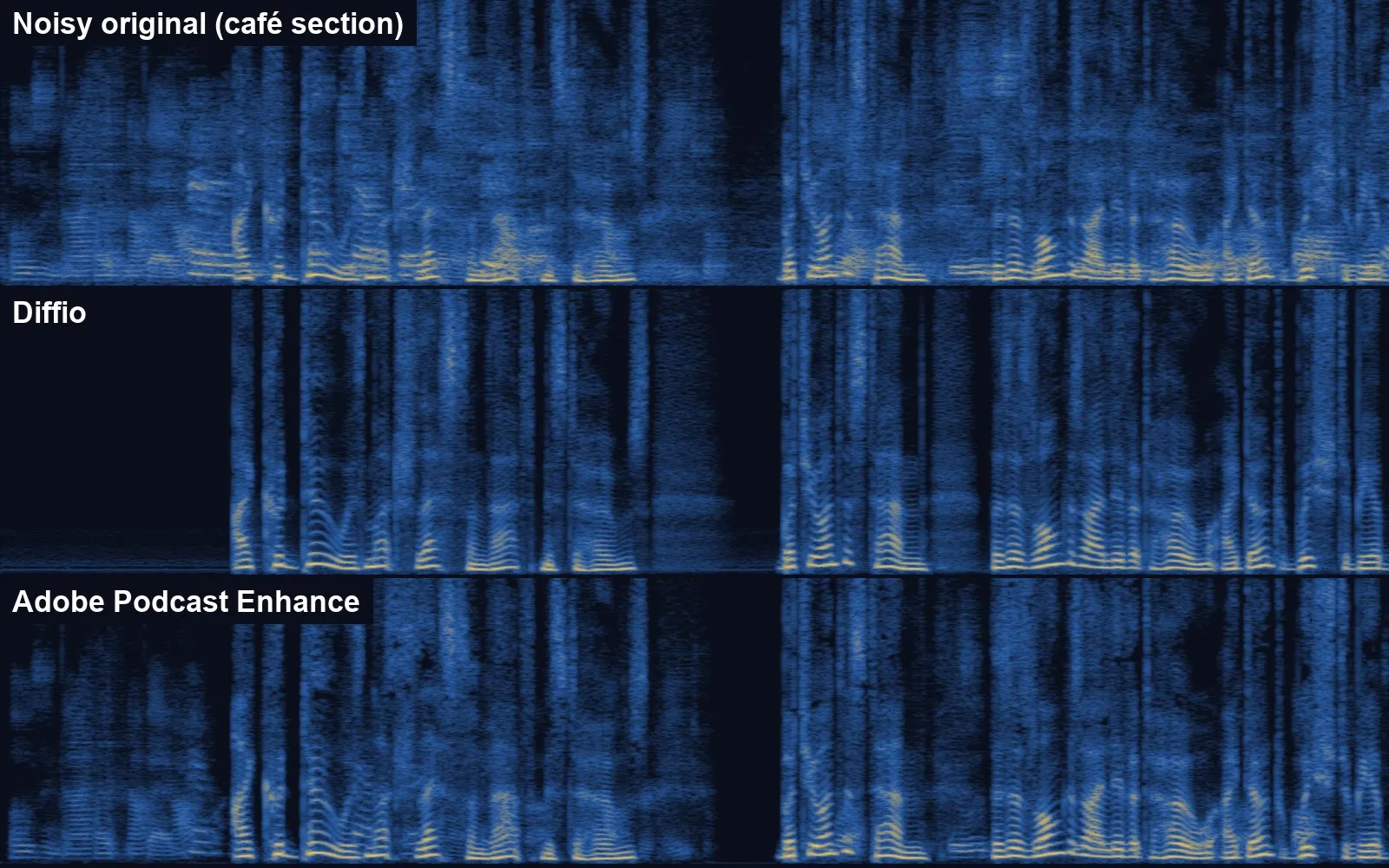
Eight seconds of the café section as pictures of sound: time runs left to right, pitch bottom to top, brighter means louder. Before our reader starts, the original is full of other people’s voices. Diffio’s version is black there. Adobe’s still has them.
Hiss and hum are easy to remove: they don’t sound like a person. Other voices are hard, because they are made of the same stuff as the voice you want to keep.
Diffio handled it. In the pauses, the chatter dropped from barely below the speaker to almost nothing. Intelligibility went from 0.77 to 0.93. Adobe removed the cups and some of the hum, but kept most of the talk behind. When we listened, the Adobe version sounded much like the original. The Diffio version sounded like a different room.
If you record interviews in cafés, at conferences or in open-plan offices, this is the section that matters.
The quiet room: Adobe is gentler
On the easy section the result flipped. Our original was already clean, with a little hum. Adobe made it better: quality rose from 3.37 to 3.71. Diffio made it slightly worse, 2.95, and the voice lost some of its natural colour.
That’s the trade-off with a strong cleaner. It works hard on everything, even when there is little to do. If your recording is already decent, Adobe is the safer choice.
Echo and street: a draw
In the echoing hall both tools reached the same intelligibility, 0.93. Diffio left less echo in the pauses. On the street, with sudden bangs every few seconds, both did well, and Adobe left slightly less rumble between sentences. Neither tool made a bang sound like speech, and neither cut words out.
Pro or Flash?
Diffio sells two models. Pro costs more to run: twice the price per hour on its developer API. On our recording it made no measurable difference. The two results matched almost sample for sample.
We asked Diffio. Nathan Harmon from the company checked the logs and confirmed our file ran on Pro. He said Pro runs the model through more passes, which can help with room tone and with words on badly damaged audio. Once the audio reaches a certain quality, more passes don’t help. Diffio’s own benchmarks put Flash ahead on most measures, and he wouldn’t call Pro consistently better.
One practical catch: the Pro WAV download came out about 13 dB quieter than Flash and the original. You’ll need to turn it up, or normalise it in an editor, before you use it.
Start with Flash. Try Pro only when a recording is badly damaged and Flash isn’t enough.
What it costs
| Free | Cheapest paid | More | |
|---|---|---|---|
| Diffio | 3 uploads in total, Flash only, 2-minute preview, no downloads | $8 a month: 6 hours, Flash and Pro, downloads, commercial use | $29 a month: 30 hours |
| Adobe Podcast Enhance | files up to 30 minutes, 1 hour a day | Adobe Podcast Premium, inside Adobe’s Firefly Pro plan ($19.99 a month) | files up to 2 hours, 4 hours a day, video, batch uploads, mix controls |
Diffio’s free plan is for trying it, not using it: you can hear two minutes of each result, but you can’t download anything. Adobe’s free plan is genuinely useful for shorter files: files up to 30 minutes, one hour a day. Adobe confirmed the limit when we tried the same file on a free account: it asks you to upgrade. Premium, which we had, takes files up to 2 hours and 1 GB, 4 hours a day, and accepts video.
What this means for you
- Recorded somewhere with other people talking? Use Diffio. It was the only tool that removed voices behind the speaker.
- Recording already decent? Use Adobe. The free plan covers files up to 30 minutes. It improved our clean section; Diffio made it slightly worse.
- Start with Diffio Flash, not Pro. On our file they were the same.
- Download “speech only” from Adobe if you want it clean. Its default adds some background back.
- Keep the original. Clean-up can’t be undone, and every tool changes the voice a little.
How we’re paid: Diffio gave us a free Pro account for this test. It has no affiliate programme, and we have no deal with it or with Adobe. Our Adobe account had Podcast Premium through an existing Adobe subscription.
Tested on 17 November 2026, with synthetic noise and one male reader. Measures are not ears: a woman’s voice, a different language or real room noise may give different results. Seen something different? Tell us in the comments.
Sources
More guides
- AI presentation tools compared: Gamma, Beautiful.ai, Copilot, Gemini and Canva
- AI meeting note-takers compared: Otter, Fireflies, Fathom, Granola, MeetGeek, Notuly and the built-ins
- We gave one meeting to four AI note-takers. Two knew who had to do what
- We gave four AI slide makers the same document. Two of them made up the numbers
- AI audio tools compared: voice, clean-up, editing and music
- AI video tools compared: generators, presenters and editors
- AI data analysis tools compared: from spreadsheets to big data
- AI image tools compared: ChatGPT, Gemini, Midjourney, Firefly, Ideogram, Canva and more
Comments
What do you think? No account needed. Please be kind; comments that attack people are removed.
No comments yet. Be the first.