AI audio tools compared: voice, clean-up, editing and music
A studio voice from text, a noisy recording made clean, a podcast edited like a document, a song from one sentence. What each tool costs, what the free plans allow, and the rules on cloned voices and music rights.
In short
- For a voice from text, ElevenLabs is the broadest tool: from $6 a month with commercial rights, 70+ languages on its v3 model. The free plan can't be used commercially.
- To rescue a bad recording, Adobe Podcast's Enhance Speech is free and gentle. With other people talking in the background, Diffio did much better in our 35-minute test; downloads need its $8 plan.
- To edit speech like a document, Descript removes words, fillers and noise from the transcript. Paid plans start at $16 a month billed yearly; free exports carry a watermark.
- For music, Suno's free songs belong to Suno and can't be used commercially; paid plans give you the rights. Udio has switched off downloads after its deal with Universal Music.
- Voice cloning comes with consent checks. ElevenLabs only lets you make a professional clone of your own voice, and Descript asks the speaker to read a consent statement.
Sound used to need a studio. A good microphone, a quiet room, someone who knew what a compressor was. Now a laptop and the right tool get you most of the way, and some of these tools don’t need you to speak at all.
Audio AI does four different jobs, and the best tool for one is often useless for another. So we sort them by job.
How we compared them: from each company’s own pricing and help pages, checked on 6 October 2026; the clean-up section was updated after our own test on 17 November 2026. Prices are in US dollars. Diffio gave us a free Pro account for the test; we have no affiliate deals with any of these companies.
The short answer
| You want to… | Use | Free option |
|---|---|---|
| turn text into a natural voice, or dub a video | ElevenLabs | yes, non-commercial only |
| voice-over for company training videos, in English | WellSaid | short trial |
| fix a recording that is mostly fine | Adobe Podcast Enhance Speech | yes |
| clean a recording with other people talking behind | Diffio | 3 trial uploads, no downloads |
| edit an interview or podcast by editing its text | Descript | yes, with watermark |
| make a song or a jingle | Suno | yes, but Suno owns the song |
Text to voice: ElevenLabs
ElevenLabs is the tool most people mean when they talk about AI voices. It reads text aloud in many voices, clones a voice, dubs video into other languages and transcribes speech. Its v3 model covers more than 70 languages.
| Plan | Per month | Credits | What changes |
|---|---|---|---|
| Free | $0 | 10,000 | no commercial use, no voice cloning |
| Starter | $6 | 30,000 | commercial licence, instant voice cloning |
| Creator | $22 | 121,000 | professional voice cloning |
| Pro | $99 | 600,000 | more volume |
Bigger plans run to $990 a month. Paying yearly gives two months free.
Two things to know. Your data is used to improve ElevenLabs’ models unless you switch it off: Profile, then Terms and privacy, then Data use. And a professional voice clone can only be of your own voice, checked by a spoken “voice captcha”, even if someone else has agreed. ElevenLabs blocks the voices of celebrities and other high-risk people and runs a public classifier that checks whether audio came from its models.
Best for: narration, audiobooks, dubbing, and anyone who needs many languages.
Business voice-overs: WellSaid
WellSaid is narrower and more corporate: voices for training videos, product demos and e-learning.
- Trial: free, 3 minutes of downloads a month, no commercial rights.
- Starter: $10 a month billed yearly, or $19 monthly. English only, 20 minutes a month.
- Pro: $33 a month billed yearly, or $49 monthly. 180 minutes a month.
- Business: $160 per person a month, billed yearly.
All paid plans include commercial rights, and WellSaid says customer content is never used to train its models.
Best for: HR and training teams who want safe, consistent English voice-overs.
Clean-up: Adobe Podcast Enhance Speech and Diffio
Upload a recording made in a kitchen, a car or a hall full of echo, and it comes back sounding as if it was made in a booth. It is the quickest win in this guide.
Adobe Podcast Enhance Speech is the free default.
- Free: files up to 30 minutes and 500 MB, one hour a day, audio only.
- Premium: now part of Adobe’s Firefly Pro plan at $19.99 a month. It adds video files, batch uploads, files up to 2 hours and 1 GB, 4 hours a day, and controls for how much speech, music and background to keep. Our test ran on Premium.
Watch out for: too much of it. On strong settings voices can start to sound processed. Listen before you publish.
Diffio is newer and built for long recordings with difficult noise.
- Free: 3 uploads in total, Flash model only, a 2-minute preview of each result, no downloads.
- Basic: $8 a month, 6 hours of audio or video, both models, downloads, commercial use.
- Pro: $29 a month, 30 hours.
We tested them: one noisy 35-minute recording
On 17 November 2026 we cleaned the same 35-minute recording, with four kinds of noise, in Diffio and Adobe, and measured each result against the clean original.
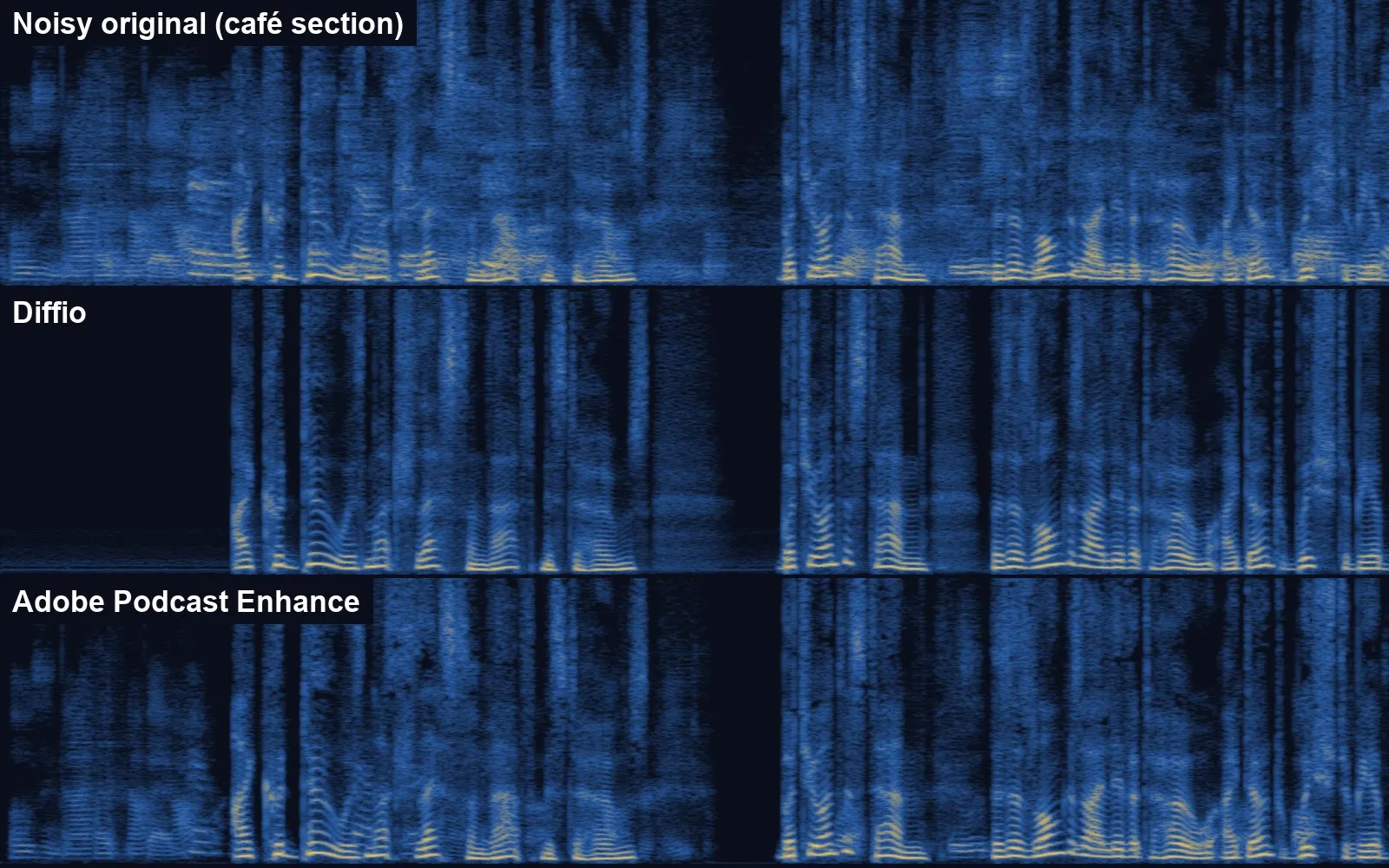
| Section | Diffio | Adobe |
|---|---|---|
| Quiet room | slightly worse than the input | better than the input |
| Café, voices behind | chatter removed | most chatter kept |
| Echo room | about the same | about the same |
| Street, bangs | about the same | about the same |
Both took the full 35 minutes in about a minute. Diffio’s Pro model sounded the same as its Flash model on our file. Read the full test, with all the scores →
Best for: Adobe for recordings that are mostly fine, free. Diffio for interviews in cafés, halls and offices, where other people talk behind the speaker.
Editing by text: Descript
Descript transcribes your recording and lets you edit the sound by editing the words. Delete a sentence in the text and it disappears from the audio. It can remove “um” and “you know” in one click, and its Studio Sound feature cleans up the voice.
| Plan | Billed yearly | Billed monthly | Media per month |
|---|---|---|---|
| Free | $0 | $0 | 60 minutes, watermarked exports |
| Hobbyist | $16 | $24 | 10 hours |
| Creator | $24 | $35 | 30 hours, voice cloning |
| Business | $50 | $65 | 40 hours |
Prices per person. Transcription works in 25 languages.
To clone a voice, the speaker has to read a consent statement aloud, and Descript does not allow clones of people who have died or have not agreed. It says its AI models in production use no customer data.
Best for: podcasters, video creators, and anyone turning a recorded talk into something people will listen to.
Music: Suno and Udio
This is where the money and the lawsuits are.
Suno writes a full song, with vocals, from a short description.
- Free: 50 credits a day, no downloads and no commercial rights. Songs made on the free plan belong to Suno.
- Pro: $8 a month as listed, with a saving for paying yearly. 2,500 credits and 20 song downloads a month, commercial use.
- Premier: $24 a month as listed. 10,000 credits, 60 downloads a month and Suno Studio.
On paid plans you own the songs you make while subscribed, and the commercial rights stay with you after you cancel. In September 2026 Suno launched its v6 models, which it says are trained on music licensed from Warner, BMG and Believe, after settling with Warner Music in November 2025.
Udio took a different turn. After its settlement and licensing deal with Universal Music in October 2025, it switched off downloads of audio, video and stems. You can still make music on the site, but you can’t take it away. Check its current terms before you plan anything around it.
Best for: Suno for jingles, background music for videos, birthday songs. For anything you sell or broadcast, read the licence first.
Transcription for developers
If you only need text from audio, the AI companies sell it by the minute. OpenAI, for example, charges from $0.003 to $0.006 a minute for its transcription models: an hour of recording for well under half a dollar. For meetings, see our comparison of AI meeting note-takers.
Rules for any AI audio
- Never clone someone’s voice without clear, recorded permission. In many countries it can break privacy, personality or fraud laws, and it is the raw material of phone scams.
- Check the licence before you publish. Free plans often forbid commercial use, and “commercial” includes a business’s YouTube channel.
- Say when a voice is synthetic in adverts, training material and anything where listeners might assume a real person is speaking.
- Switch off training on your data where the tool allows it, especially for interviews and client recordings.
- Keep the original recording. AI clean-up can’t be undone, and a court or a client may ask for the raw file.
More tool comparisons
Sources
- ElevenLabs: Pricing (checked 6 October 2026)
- ElevenLabs: Models and languages
- ElevenLabs: Safety
- ElevenLabs Help: Can I create a Professional Voice Clone of someone else's voice?
- ElevenLabs Help: Is my data used to improve ElevenLabs models?
- Descript: Pricing (checked 6 October 2026)
- Descript Help: Data privacy
- Descript: Ethics
- Adobe Podcast: Plans
- Adobe Firefly: Plans
- WellSaid: Pricing
- Suno: Pricing
- Suno Help: Who owns the songs I make?
- Suno: Introducing v6 (9 September 2026)
- Suno: Partnership with Warner Music Group
- Udio Help: Changes associated with the Universal Music Group partnership
- Udio: A new era (29 October 2025)
- Diffio: Pricing
- AI Beat: We cleaned one noisy 35-minute recording with Diffio and Adobe (17 November 2026)
- OpenAI API: Pricing
More guides
- AI presentation tools compared: Gamma, Beautiful.ai, Copilot, Gemini and Canva
- AI meeting note-takers compared: Otter, Fireflies, Fathom, Granola, MeetGeek, Notuly and the built-ins
- We gave one meeting to four AI note-takers. Two knew who had to do what
- We gave four AI slide makers the same document. Two of them made up the numbers
- We cleaned one noisy 35-minute recording with Diffio and Adobe. Background voices decided it
- AI video tools compared: generators, presenters and editors
- AI data analysis tools compared: from spreadsheets to big data
- AI image tools compared: ChatGPT, Gemini, Midjourney, Firefly, Ideogram, Canva and more
Comments
What do you think? No account needed. Please be kind; comments that attack people are removed.
No comments yet. Be the first.