AI meeting note-takers compared: Otter, Fireflies, Fathom, Granola, MeetGeek, Notuly and the built-ins
An AI that listens to your calls and writes the minutes is one of the most useful tools at work. It is also a recording of other people. What each tool costs, what the free plans give you, and how to use one without getting into trouble.
In short
- Check what you already have. Google Meet, Zoom and Microsoft Teams all offer built-in AI notes, and your company may already pay for them.
- Fathom has the most generous free plan: unlimited recordings and transcripts with instant summaries. Fireflies and Otter have free plans with tighter limits.
- Granola records the audio on your own computer instead of sending a bot into the call, and deletes the audio after transcribing it.
- For European data, Notuly processes everything in Amsterdam and MeetGeek lets you keep data in the EU. For health data, only specific plans offer HIPAA compliance, usually the most expensive ones.
- In our hands-on test on 17 November 2026, Notuly and Gemini gave every task to the right person. Fireflies left four tasks unassigned; MeetGeek gave five to someone who wasn't in the meeting.
- Recording a meeting is recording people. Tell everyone at the start, follow your employer's rules, and never record a client, patient or job candidate without their agreement.
Nobody likes taking minutes. You either listen or you write; doing both badly is the usual compromise. An AI note-taker ends that. It joins the call, transcribes it, and a minute after you hang up you have a summary, decisions and a list of who promised what.
That is why these tools have spread so fast. It is also why they need some care. A note-taker is a recording device, and the other people in the call are being recorded too.
How we compared them: from each company’s own pricing and help pages, checked on 6 October 2026 and updated on 17 November 2026. Prices are in US dollars per person unless marked. On 17 November we also tested four of them on the same meeting. We have no affiliate deals with any of these companies.
The short answer
| If you… | Use | Why |
|---|---|---|
| have Google Workspace, Zoom or Teams at work | the built-in notes | Already paid for, already approved by your employer |
| want the best free plan | Fathom | Unlimited recordings and transcripts, instant summaries |
| don’t want a bot joining your calls | Granola | Records on your own computer; audio deleted after transcription |
| need data kept in the EU | Notuly or MeetGeek | Notuly processes in Amsterdam; MeetGeek lets you choose EU storage |
| need search and analytics across a team’s calls | Fireflies | Strong search, many languages, analytics on paid plans |
| mainly record in-person meetings and lectures | Otter | Mobile app and live transcription in six languages |
What happened when we tested them
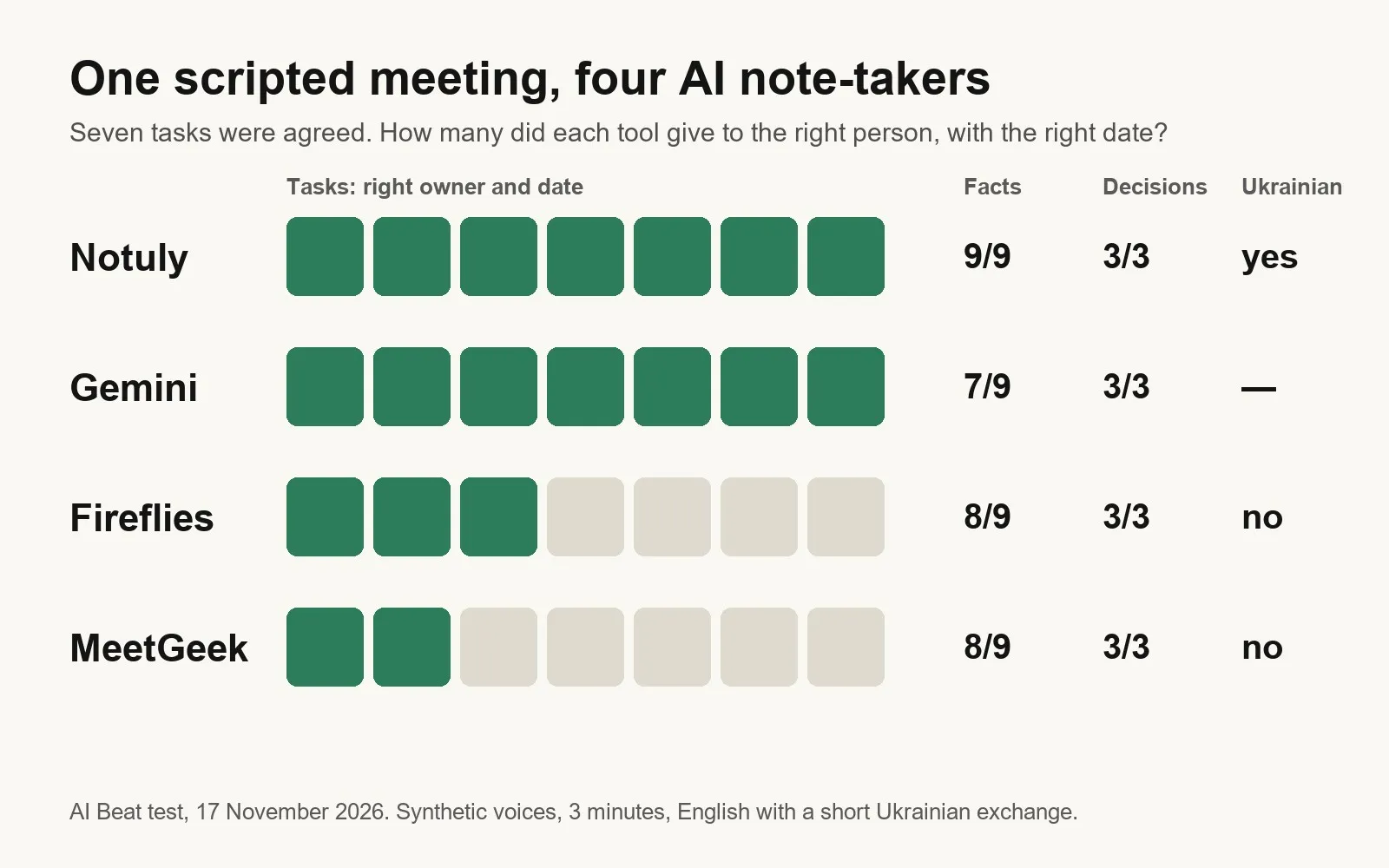
We wrote a three-minute meeting with 3 decisions, 7 tasks and a few traps, had two synthetic voices read it, and gave it to Notuly, Gemini, Fireflies and MeetGeek on 17 November 2026.
| Notuly | Gemini | Fireflies | MeetGeek | |
|---|---|---|---|---|
| Decisions found (of 3) | 3 | 3, plus one invented | 3 | 3 |
| Tasks with the right owner and date (of 7) | 7 | 7 | 3, four unassigned | 2, five to the wrong person |
| Understood the Ukrainian lines | yes | can’t tell | no | no |
| Time to the summary | about 1 minute | under 1 minute | about 1 minute | about 3 minutes |
Every tool found the decisions and ignored our coffee-machine joke. The difference was who does what. Synthetic voices are the easy case, so expect more mistakes in a real meeting. Read the full test.
Start with what you already have
Google Meet: “Take notes for me”. Gemini writes the notes into a Google Doc and shares it with the team, and late joiners can read a “summary so far”. It works in English, French, German, Italian, Japanese, Korean, Portuguese and Spanish. Everyone in the call is told that notes are being taken and sees a pencil icon. It needs an eligible Workspace or Google AI plan.
Zoom. Zoom’s AI assistant gives free-plan hosts meeting summaries for three meetings a month. Unlimited AI note-taking is part of a paid plan.
Microsoft Teams. If your company has licensed Copilot, Teams can recap meetings and answer questions about them.
If your employer already pays for one of these, use it. The data stays under the contracts and settings your IT team has already agreed to, which matters more than any feature below.
Fathom
The most generous free plan in this group: unlimited recordings and transcriptions, instant AI summaries, clips and search.
- Free: $0, unlimited recordings.
- Premium: $20 a month, or $16 billed yearly. Better summaries, action items, a chat assistant, a custom bot name.
- Team: $19 a month, or $15 billed yearly, for two or more people.
- Business: $34 a month, or $25 billed yearly, with CRM sync and coaching tools.
It normally joins as a bot; a bot-free mode is in beta on Mac.
Best for: anyone who wants to try a note-taker without paying.
Fireflies
Fireflies is built for teams that live on calls: sales, customer success, recruiting. It transcribes in more than 100 languages and lets you search across every meeting.
- Free: unlimited transcription, limited AI summaries, 400 minutes of storage per team.
- Pro: $18 a month, or $10 billed yearly. Unlimited summaries, video recording, downloads.
- Business: $29 a month, or $19 billed yearly. Unlimited storage, analytics, multi-language mode.
- Enterprise: $39 billed yearly, with HIPAA compliance, private storage and custom retention.
Fireflies says customer data is never used to train AI. A Chrome extension can record without the bot.
Sign-up pushes you to a 7-day Business trial that needs a card and turns into $29 a month. To stay on the free plan, skip it: opening app.fireflies.ai directly took us to the free dashboard. In our test it found every task but left four without an owner.
Best for: teams that need to find what was said across hundreds of calls.
Otter
One of the oldest names in AI transcription, strong on live captions and recording in the room, not just online.
- Basic (free): 300 minutes a month, conversations of up to 30 minutes, three file imports in total.
- Pro: $16.99 a month, or $8.33 billed yearly. 1,200 minutes a month, conversations of up to 90 minutes.
- Business: $30 a month, or $19.99 billed yearly. Unlimited meetings, up to four hours each.
Transcription works in English, Spanish, French, German, Japanese and Chinese. HIPAA compliance is an Enterprise add-on.
Best for: students, journalists and people who record talks and in-person meetings.
Granola
Granola takes a different approach. There is no bot in the call. It captures the audio on your own computer, transcribes it, and deletes the audio afterwards. You write rough notes during the meeting and it fills them in.
- Basic (free): AI notes and chat, but only 30 days of meeting history.
- Business: $14 a month.
- Enterprise: $35 a month, with HIPAA-compliant workspaces and SSO.
You can opt out of model training on any plan.
Best for: people who find meeting bots awkward, especially in calls with clients.
MeetGeek
MeetGeek’s selling point for Europe is a choice of where your data lives: the EU or the US.
- Free: 3 hours of transcription a month, file uploads allowed, transcripts kept for 3 months.
- Pro: $15.99 a month, or $9.99 billed yearly. 20 hours.
- Business: $27 a month, or $17 billed yearly. Unlimited transcription.
It transcribes in more than 100 languages and detects the language automatically.
In our test MeetGeek found every task, but put the name on our MeetGeek account on five of them, though that person wasn’t in the meeting. Check the owners before you share its notes.
Best for: European companies whose data protection officer asks where the data goes.
Notuly
A Dutch note-taker built around privacy: everything is processed on servers in Amsterdam, the audio is deleted after processing, and nothing is used for training. It records with a desktop or phone app, without a bot in the call. It can’t take an uploaded file. The report arrives by email in English or Dutch, with the transcript attached; spoken languages are detected automatically.
- Starter (free): 3 meetings a month, up to 60 minutes each.
- Pro: €9.99 a month billed yearly, or €13.49 monthly, VAT included. Unlimited meetings.
- Team: €10.99 per user a month billed yearly, VAT excluded, for two or more people. Includes a data processing agreement.
The data processing agreement only comes with Team or Enterprise. If your company needs one, Pro is not enough.
In our test Notuly was the only tool with no mistakes, and the only one that understood a few lines in Ukrainian. Notuly gave us a free Pro account for it.
Best for: European teams that want the data to stay in the EU and don’t need to upload old recordings.
The rules most people skip
The tool is the easy part. These are the parts that cause trouble.
- Tell people. Say at the start that an AI is taking notes, and why. In the EU, recording people means processing their personal data, so you need a good reason and they need to know. In some places, including California, recording a conversation needs everyone’s consent.
- Respect a no. If someone asks you to switch it off, switch it off. Some people speak less freely when recorded, which defeats the purpose of the meeting.
- Follow your employer’s rules. Many companies ban personal note-taking apps in work calls. Using an unapproved tool can send client data to a company your employer has no contract with.
- Be stricter with sensitive calls. Doctors, lawyers and HR need more than a free plan:
- Health: patient conversations need a tool and plan covered by a proper data agreement, such as a HIPAA business associate agreement in the US. On most tools that means the top plan. Read our guide for doctors.
- Law: a transcript of a client meeting is confidential material stored on someone else’s servers. Check what your bar rules say. See AI for lawyers.
- HR: interviews, performance talks and complaints involve some of the most sensitive data a company holds. See AI for HR.
- Check the summary. AI summaries miss irony, mix up who said what and turn “maybe” into a decision. Read them before you send them on.
- Set a deletion date. Recordings you no longer need are a risk with no benefit. Most tools let you set how long they are kept.
More practical guides
Sources
- Otter.ai: Pricing (checked 6 October 2026)
- Fireflies.ai: Pricing (checked 17 November 2026)
- Fathom: Pricing (checked 6 October 2026)
- Granola: Pricing (checked 6 October 2026)
- MeetGeek: Pricing (checked 17 November 2026)
- Notuly: Plans and privacy (checked 17 November 2026)
- AI Beat: We gave one meeting to four AI note-takers
- Google Meet Help: Take notes for me
- Zoom: AI assistant
More guides
- AI presentation tools compared: Gamma, Beautiful.ai, Copilot, Gemini and Canva
- We gave one meeting to four AI note-takers. Two knew who had to do what
- We gave four AI slide makers the same document. Two of them made up the numbers
- AI audio tools compared: voice, clean-up, editing and music
- We cleaned one noisy 35-minute recording with Diffio and Adobe. Background voices decided it
- AI video tools compared: generators, presenters and editors
- AI data analysis tools compared: from spreadsheets to big data
- AI image tools compared: ChatGPT, Gemini, Midjourney, Firefly, Ideogram, Canva and more
Comments
What do you think? No account needed. Please be kind; comments that attack people are removed.
No comments yet. Be the first.